

闲时又把allure的官方文档中关于pytest的相关部分重新看了一遍,发现之前还是有遗漏了一些有趣的东西。
今天讲一下在allure的报告中放入一些描述description
有三种方式可以对用例进行描述:
1⃣️直接在test中用'''我是注释'''写描述
2⃣️@allure.description
3⃣️@allure.description_html
由于1⃣️和2⃣️有点中规中矩就不说了
开始介绍一下3⃣️
首先它的效果如下:
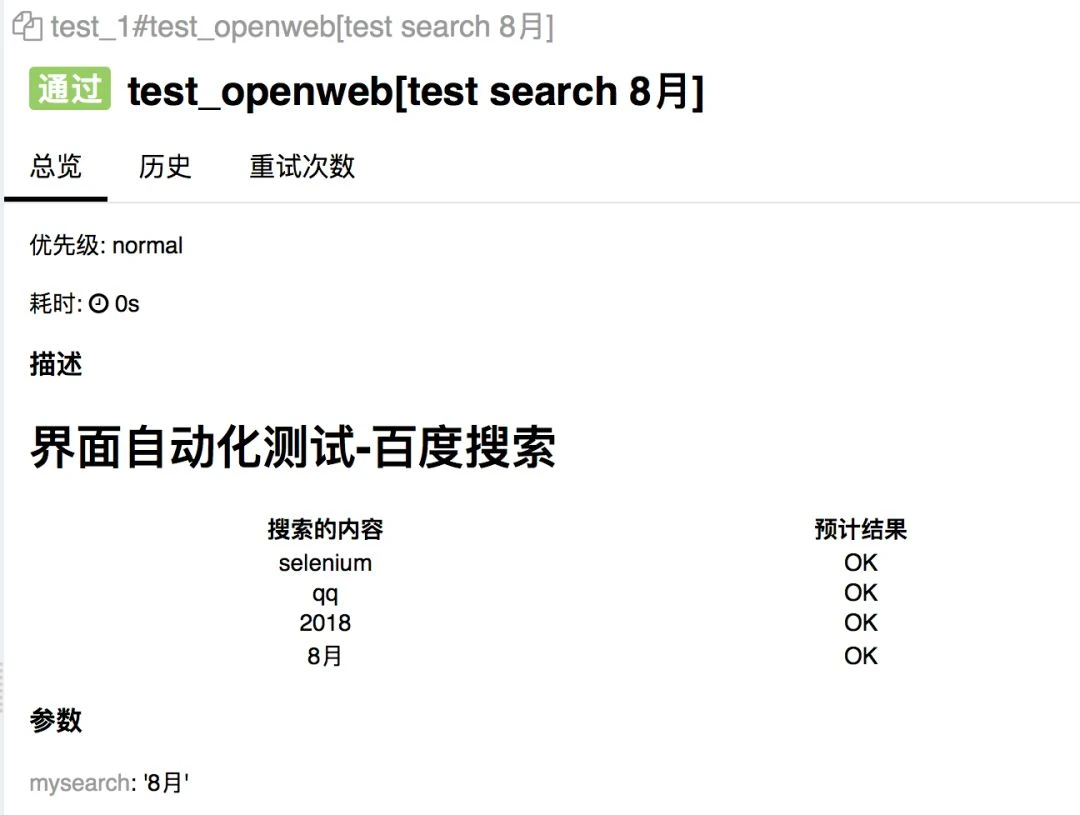
下面开始写脚本实现
Html文件编写
写一个只有一个表单的html段
 1<h1>界面自动化测试-百度搜索</h1>
 2<table style="width:100%">
 3  <tr>
 4    <th>搜索的内容</th>
 5    <th>预计结果</th>
 6  </tr>
 7  <tr align="center">
 8    <td>{}</td>
 9    <td>OK</td>
10  <tr align="center">
11    <td>{}</td>
12    <td>OK</td>
13  <tr align="center">
14    <td>{}</td>
15    <td>OK</td>
16  <tr align="center">
17    <td>{}</td>
18    <td>OK</td>
19  </tr>
20</table>
这段代码通过浏览器解析后就是一个简单的表格了,由于前端能力大概就这样了所以先这样了
测试环境准备
首先是打开浏览器,使用了reques的addfinalizer注册了一个环境清理的函数,函数closemydriver会在测试完之后执行,也就是关闭chrome浏览器
 1@pytest.fixture(scope='module')
 2@allure.step('打开浏览器')
 3def mychromedriver(request):
 4    driver = webdriver.Chrome()
 5    driver.implicitly_wait(8)
 6    driver.get('https://www.baidu.com')
 7    def closemydriver():
 8        driver.close()
 9    request.addfinalizer(closemydriver)
10    return driver
测试数据
由于pytest奇怪的机制,只能人工的准备好待测试的数据
1data = ['selenium','qq','2018','8月']
使用fixture遍历

装饰器中将mysearch定义为module级别的,其实也没啥用,function效果也是一样
遍历的数据params是之前的data,并用ids给用例起了几个名字
函数主体中用allure.attach打印了正在测试的数据
接下来几行selenium的简单操作,然后把页面的标题和正在测试的数据进行了返回
1@pytest.fixture(scope='module',params=data,ids=['test search selenium','test seatch qq','test search 2018','test search 8月'])
2def mysearch(mychromedriver,request):
3    allure.attach("用例参数", "{0}".format(request.param))
4    mychromedriver.find_element_by_id('kw').clear()
5    mychromedriver.find_element_by_id('kw').send_keys(request.param)
6    mychromedriver.find_element_by_id('su').click()
7    time.sleep(2)
8    return mychromedriver.title,request.param
开始测试

把刚才的 HTML 一股脑地塞给@allure.description_html就好了
下面几个是feature,story,testcase是用例的层级关系看到报告里的对应内容就知道是什么了,口头上难以描述
测试主体简单的进行了网页标题与搜索内容的校验
 1@allure.description_html("""
 2<h1>界面自动化测试-百度搜索</h1>
 3<table style="width:100%">
 4  <tr>
 5    <th>搜索的内容</th>
 6    <th>预计结果</th>
 7  </tr>
 8  <tr align="center">
 9    <td>{}</td>
10    <td>OK</td>
11  <tr align="center">
12    <td>{}</td>
13    <td>OK</td>
14  <tr align="center">
15    <td>{}</td>
16    <td>OK</td>
17  <tr align="center">
18    <td>{}</td>
19    <td>OK</td>
20  </tr>
21</table>""".format(data[0],data[1],data[2],data[3]))
22@allure.feature("界面自动化测试")
23@allure.story("界面自动化测试_baidu")
24@allure.testcase("用例名:打开百度并搜索")
25def test_openweb(mysearch):
26    title = mysearch[0]
27    if mysearch[1] in title:
28        ulRet = 1,'正常打开网页并完成搜索'
29    else:
30        ulRet = 0,'打开网页搜索失败'
31    assert ulRet
32
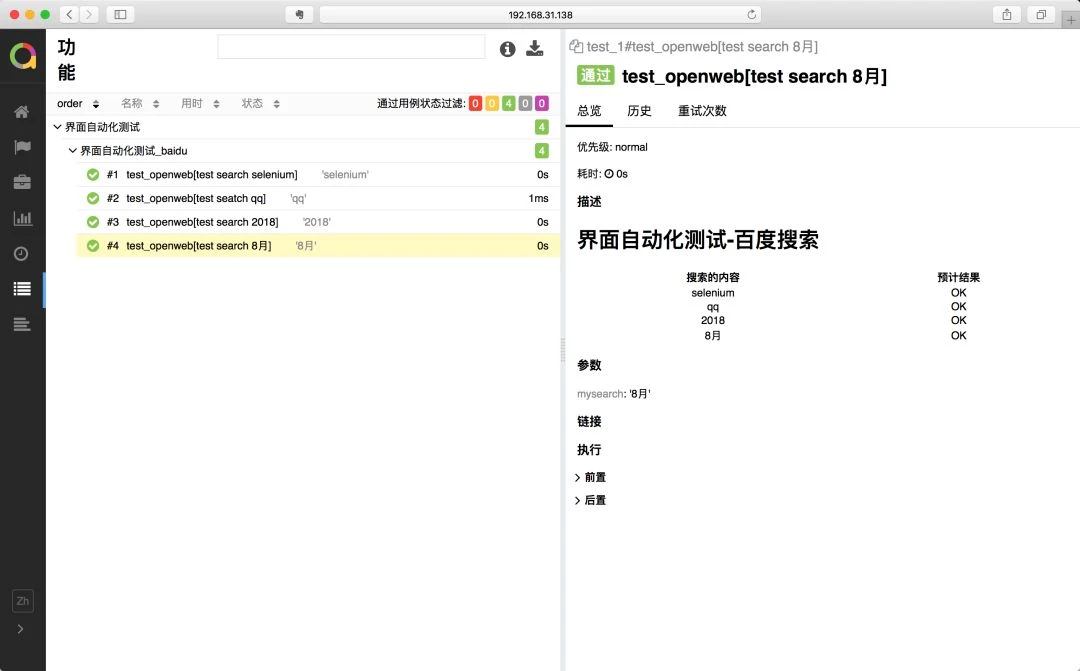
运行如下语句就能产生报告并在页面展示了
1pytest test_1.py --alluredir=./my_allure_results
2allure serve ./my_allure_results
效果图
全部代码
 1#!/usr/bin/env python
 2# -*- coding:utf-8 -*-
 3#Author:zhongxin
 4#datetime:2018/8/25 下午11:11
 5import allure
 6import pytest
 7import time
 8from selenium import webdriver
 9
10@pytest.fixture(scope='module')
11@allure.step('打开浏览器')
12def mychromedriver(request):
13    driver = webdriver.Chrome()
14    driver.implicitly_wait(8)
15    driver.get('https://www.baidu.com')
16    def closemydriver():
17        driver.close()
18    request.addfinalizer(closemydriver)
19    return driver
20
21data = ['selenium','qq','2018','8月']
22@pytest.fixture(scope='module',params=data,ids=['test search selenium','test seatch qq','test search 2018','test search 8月'])
23def mysearch(mychromedriver,request):
24    allure.attach("用例参数", "{0}".format(request.param))
25    mychromedriver.find_element_by_id('kw').clear()
26    mychromedriver.find_element_by_id('kw').send_keys(request.param)
27    mychromedriver.find_element_by_id('su').click()
28    time.sleep(2)
29    return mychromedriver.title,request.param
30
31
32@allure.description_html("""
33<h1>界面自动化测试-百度搜索</h1>
34<table style="width:100%">
35  <tr>
36    <th>搜索的内容</th>
37    <th>预计结果</th>
38  </tr>
39  <tr align="center">
40    <td>{}</td>
41    <td>OK</td>
42  <tr align="center">
43    <td>{}</td>
44    <td>OK</td>
45  <tr align="center">
46    <td>{}</td>
47    <td>OK</td>
48  <tr align="center">
49    <td>{}</td>
50    <td>OK</td>
51  </tr>
52</table>""".format(data[0],data[1],data[2],data[3]))
53@allure.feature("界面自动化测试")
54@allure.story("界面自动化测试_baidu")
55@allure.testcase("用例名:打开百度并搜索")
56def test_openweb(mysearch):
57    title = mysearch[0]
58    if mysearch[1] in title:
59        ulRet = 1,'正常打开网页并完成搜索'
60    else:
61        ulRet = 0,'打开网页搜索失败'
62    assert ulRet
63
评论与讨论
使用 GitHub 账号留言,评论公开显示。
点评论时间可定位到原评论,在 GitHub 用评论旁的「…」修改或删除自己的留言。