WebMCP 是什么?
WebMCP(Web Model Context Protocol) 是一个提议的浏览器级 Web 标准,让任何网页都能将其功能声明为 AI Agent 可调用的结构化工具。
可以这样理解:WebMCP 将你的网站变成 AI Agent 可以使用的 API——而无需你构建或维护单独的 API。
没有 WebMCP: AI Agent 爬取你的页面,猜测哪些输入字段需要什么数据,希望表单接受它的输入,然后祈祷一切顺利。
有了 WebMCP: 你的网站说「我这里有一个叫
searchFlights的函数。它需要出发地、目的地和日期。调用它,我会给你结构化的结果。」Agent 调用这个函数。获取数据。继续执行。
背后的支持很强大:这是 Google Chrome 团队和 Microsoft Edge 团队的联合努力,通过 W3C 孵化。预计到 2026 年中后期将获得更广泛的浏览器支持。
为什么需要 WebMCP
AI Agent 正在成为主要的 Web 用户
2026 年 1 月,Google 推出了由 Gemini 驱动的 Chrome 自动浏览功能。OpenAI 的 Atlas 浏览器推出了 Agent 模式。Perplexity 的 Comet 正在跨平台进行全任务浏览。
| 产品 | 公司 | 发布时间 | 核心能力 |
|---|---|---|---|
| Chrome Auto Browse | |||
| Atlas(Agent Mode) | |||
| Comet | |||
| Disco |
那些让这些 Agent 能够轻松完成任务的网站将获得更多流量。那些做不到的网站将被跳过,转向竞争对手。
这是 AI 时代的响应式设计时刻
当移动时代到来时,那些早期采用响应式设计的网站赢得了分发游戏。后来者只能追赶,而流量已经转移。
WebMCP 是同样的动态。那些首先成为 Agent 就绪的网站,随着 Agent 电商成为主流,将获得复合优势。
一次结构化调用替代数十步操作
没有 WebMCP,AI Agent 需要截图、解析 HTML、猜测按钮功能、点击筛选器、滚动结果——每一步都在消耗 token 并增加延迟。
有了 WebMCP,只需三步:发现工具 → 读取 schema → 执行一次调用。
WebMCP 如何设置
WebMCP 为开发者提供了两种让网站为 Agent 准备就绪的方法:Declarative API(声明式 API) 和 Imperative API(命令式 API)。
Declarative API(基于 HTML)
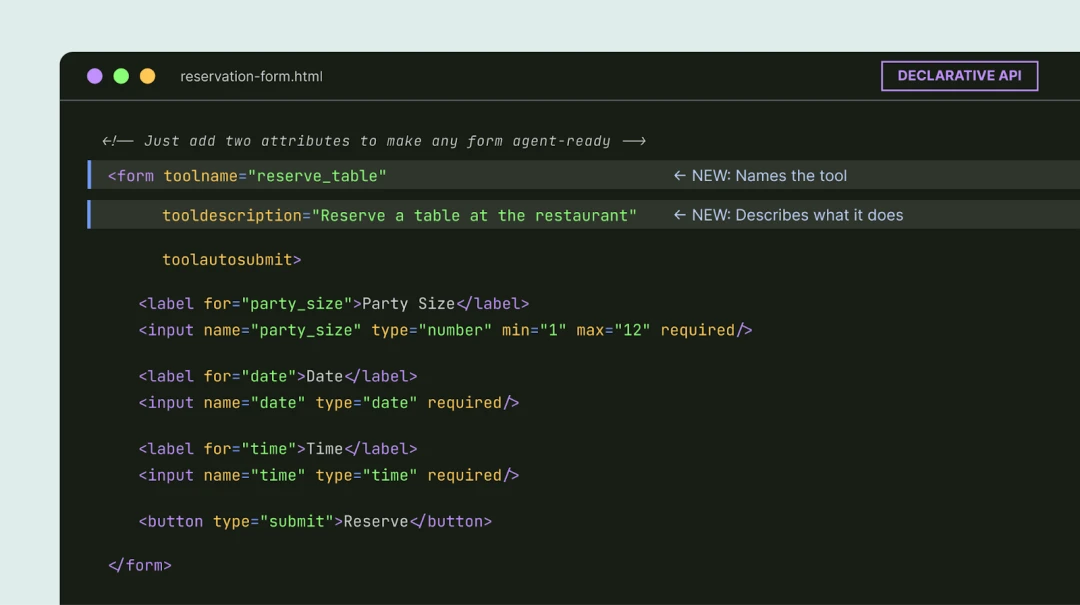
这是低投入选项。如果你的网站已经有标准 HTML 表单,你可以通过添加几个属性让它们与 Agent 兼容。
餐厅预订表单会获得 toolname 和 tooldescription 属性。浏览器会自动将其字段转换为 AI Agent 可以解释的结构化 schema。
<form toolname="reserveRestaurant"
      tooldescription="预订餐厅座位。需要日期、时间、人数和联系人信息。">
  <label>
    日期: <input type="date" name="date" required />
  </label>
  <label>
    时间: <input type="time" name="time" required />
  </label>
  <label>
    人数: <input type="number" name="partySize" required min="1" />
  </label>
  <label>
    姓名: <input type="text" name="name" required />
  </label>
  <button type="submit">预订</button>
</form>
Imperative API(基于 JavaScript)
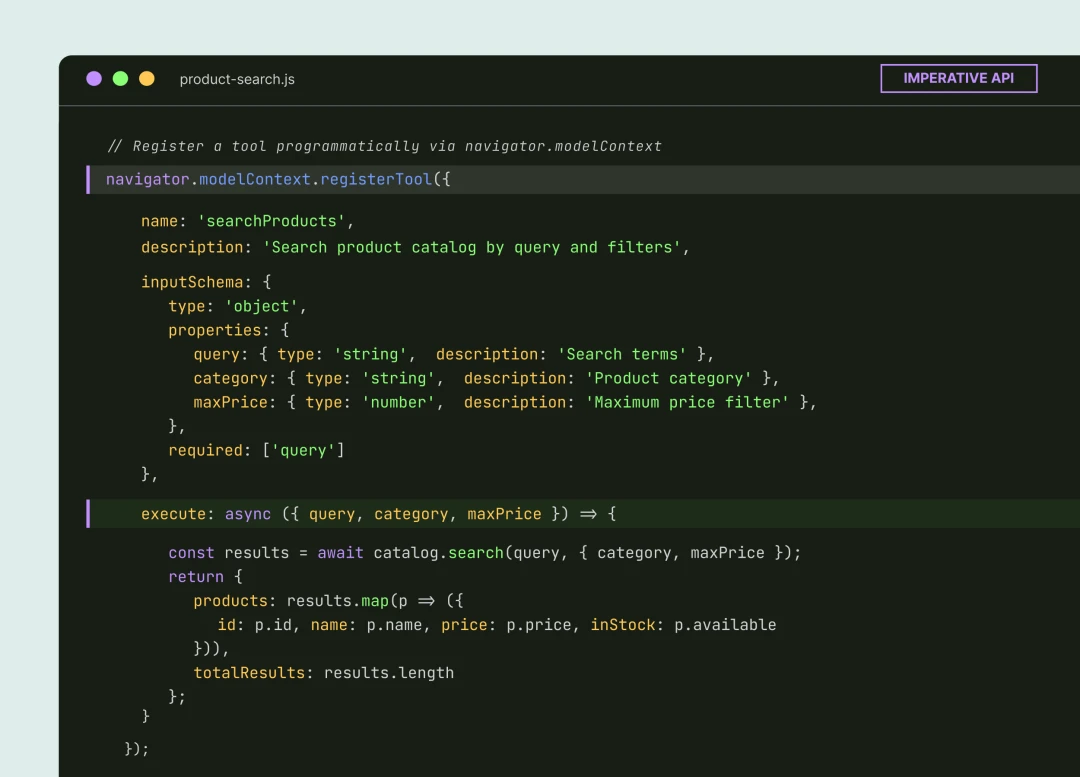
这是用于更复杂、动态交互的 API。
开发者通过一个新的浏览器接口 navigator.modelContext 以编程方式注册工具。你为工具提供名称、描述、输入 schema 和执行函数。
// 注册一个动态工具
navigator.modelContext.addTool({
  name: 'addToCart',
  description: '将商品添加到购物车',
  inputSchema: {
    type: 'object',
    properties: {
      productId: {
        type: 'string',
        description: '商品 ID'
      },
      quantity: {
        type: 'number',
        description: '添加数量',
        default: 1
      }
    },
    required: ['productId']
  },
  execute: async (input) => {
    // 执行添加到购物车的逻辑
    const result = await cartAPI.addItem(input.productId, input.quantity);
    return {
      success: true,
      cartTotal: result.total,
      itemCount: result.count
    };
  }
});

// 可以根据页面状态动态注销工具
// 当购物车为空时,移除结账工具
if (cart.isEmpty()) {
  navigator.modelContext.removeTool('checkout');
}
特别强大的地方:工具可以根据页面状态注册和注销。只有当购物车中有商品时,结账工具才会出现。只有在选择日期后,预订工具才会显示。Agent 只能看到与当前上下文相关的内容。
如何测试 WebMCP
WebMCP 在 Chrome 146 中通过功能标志已经可用。以下是亲身体验的方法:
步骤 1: 确保你运行的是 Chrome 版本 146.0.7672.0 或更高版本。
步骤 2: 导航到 chrome://flags/#enable-webmcp-testing 并将标志设置为「Enabled」。
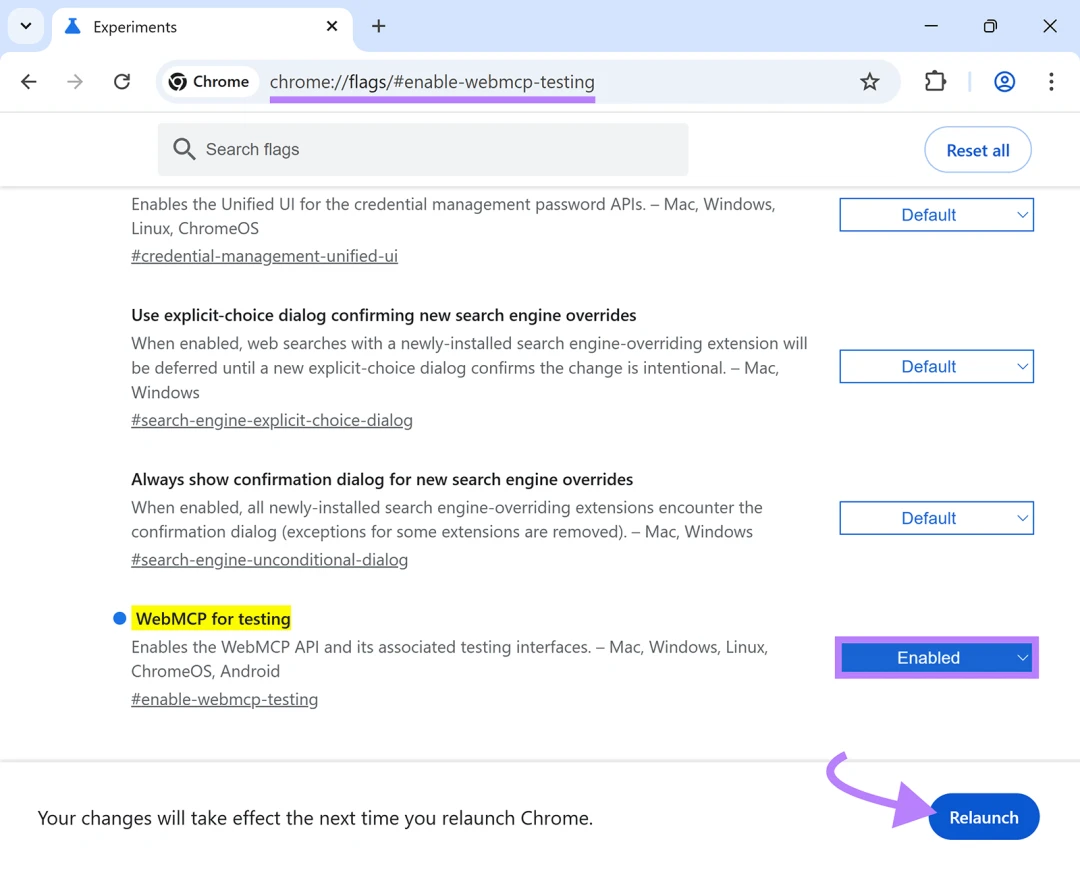
步骤 3: 重新启动 Chrome。
步骤 4: 从 Chrome 网上应用店安装 Model Context Tool Inspector 扩展程序。它允许你检查任何页面上注册的工具并使用自定义参数测试它们。
真实案例
官方测试地址
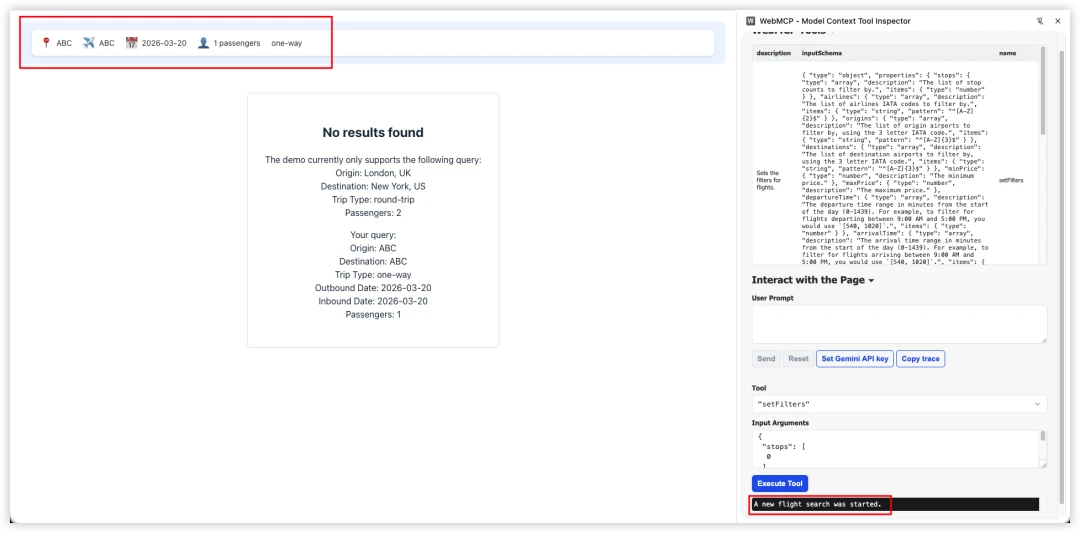
Google 还发布了一个在线旅行演示,你可以在其中看到完整的流程——从发现工具到使用自然语言调用它们。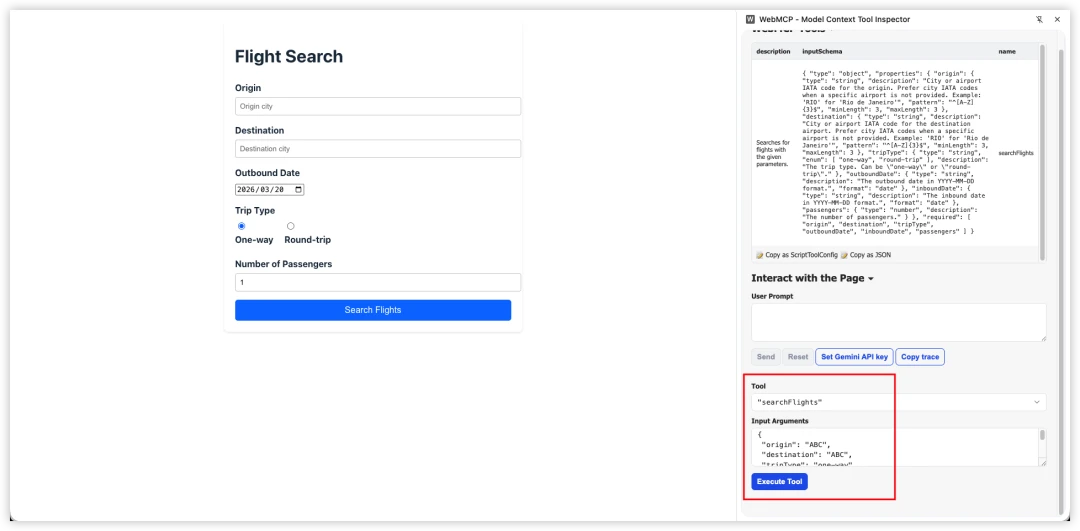
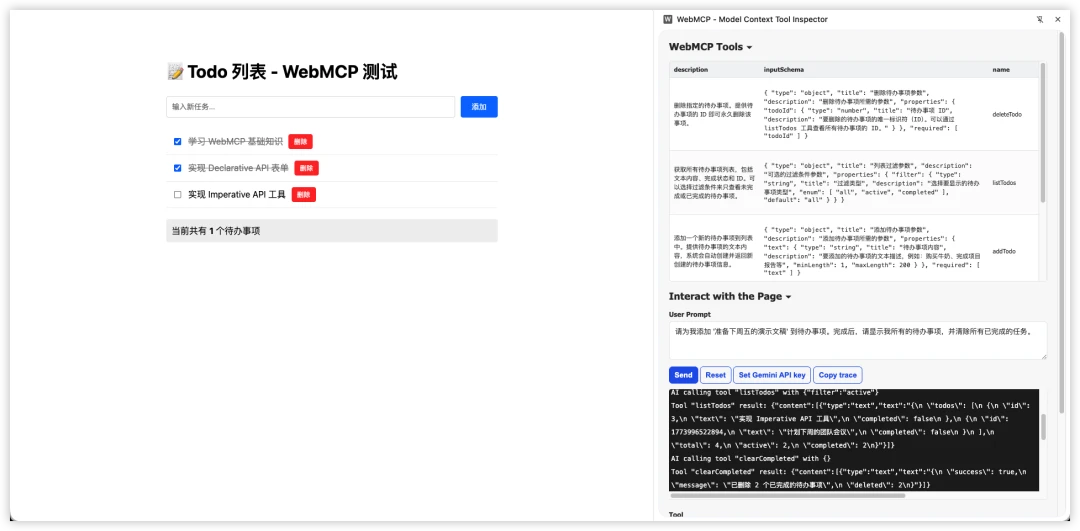
一个简单的 Todo 页面,使用 WebMCP 完成 Todo 增删改查
<!DOCTYPE html>
<html lang="zh-CN">
<head>
  <meta charset="UTF-8">
  <meta name="viewport" content="width=device-width, initial-scale=1.0">
  <title>WebMCP Todo Demo</title>
  <style>
    body {
      font-family: system-ui, -apple-system, sans-serif;
      max-width: 600px;
      margin: 50px auto;
      padding: 20px;
    }
    .todo-item {
      display: flex;
      align-items: center;
      gap: 10px;
      padding: 10px;
      border-bottom: 1px solid #eee;
    }
    .todo-item.completed span {
      text-decoration: line-through;
      color: #888;
    }
    form {
      display: flex;
      gap: 10px;
      margin-bottom: 20px;
    }
    input[type="text"] {
      flex: 1;
      padding: 10px;
      border: 1px solid #ddd;
      border-radius: 4px;
    }
    button {
      padding: 10px 20px;
      background: #007AFF;
      color: white;
      border: none;
      border-radius: 4px;
      cursor: pointer;
    }
    button:hover {
      background: #0051D5;
    }
    .delete-btn {
      background: #FF3B30;
      padding: 5px 10px;
      font-size: 12px;
    }
    .delete-btn:hover {
      background: #C8261C;
    }
    .status {
      padding: 10px;
      background: #f0f0f0;
      border-radius: 4px;
      margin-top: 20px;
    }
  </style>
</head>
<body>
  <h1>📝 Todo 列表 - WebMCP 测试</h1>

  <!-- 手动添加 Todo 的表单 -->
  <form id="addTodoForm">
    <input
      type="text"
      name="text"
      placeholder="输入新任务..."
      required
      autocomplete="off">
    <button type="submit">添加</button>
  </form>

  <div id="todoList"></div>

  <div class="status" id="status">
    当前共有 <strong id="count">0</strong> 个待办事项
  </div>

  <script>
    // Todo 数据存储
    let todos = [
      { id: 1, text: '学习 WebMCP 基础知识', completed: true },
      { id: 2, text: '实现 Declarative API 表单', completed: true },
      { id: 3, text: '实现 Imperative API 工具', completed: false },
    ];

    // 渲染 Todo 列表
    function renderTodos() {
      const list = document.getElementById('todoList');
      const count = document.getElementById('count');
      list.innerHTML = '';
      count.textContent = todos.filter(t => !t.completed).length;

      todos.forEach(todo => {
        const item = document.createElement('div');
        item.className = `todo-item${todo.completed ? ' completed' : ''}`;
        item.innerHTML = `
          <input type="checkbox" ${todo.completed ? 'checked' : ''} onchange="toggleTodo(${todo.id})">
          <span>${escapeHtml(todo.text)}</span>
          <button class="delete-btn" onclick="deleteTodo(${todo.id})">删除</button>
        `;
        list.appendChild(item);
      });
    }

    // 添加 Todo(手动表单提交)
    document.getElementById('addTodoForm').addEventListener('submit', (e) => {
      e.preventDefault();
      const formData = new FormData(e.target);
      const text = formData.get('text');
      if (text.trim()) {
        todos.push({
          id: Date.now(),
          text: text.trim(),
          completed: false
        });
        e.target.reset();
        renderTodos();
      }
    });

    // 切换完成状态
    function toggleTodo(id) {
      todos = todos.map(t =>
        t.id === id ? { ...t, completed: !t.completed } : t
      );
      renderTodos();
    }

    // 删除 Todo
    function deleteTodo(id) {
      todos = todos.filter(t => t.id !== id);
      renderTodos();
    }

    // HTML 转义
    function escapeHtml(text) {
      const div = document.createElement('div');
      div.textContent = text;
      return div.innerHTML;
    }

    // ===== WebMCP Imperative API =====
    // 初始化 WebMCP 工具
    async function initWebMCP() {
      // 检查 API 是否可用
      if (typeof navigator.modelContext === 'undefined') {
        console.error('WebMCP 不可用,请确保:1. 使用 Chrome 146+  2. 在 chrome://flags/#enable-webmcp-testing 启用  3. 重启浏览器');
        return;
      }

      try {
        // 1. 注册"添加 Todo"工具
        await navigator.modelContext.registerTool({
          name: 'addTodo',
          description: '添加一个新的待办事项到列表中。提供待办事项的文本内容,系统会自动创建并返回新创建的待办事项信息。',
          inputSchema: {
            type: 'object',
            title: '添加待办事项参数',
            description: '添加待办事项所需的参数',
            properties: {
              text: {
                type: 'string',
                title: '待办事项内容',
                description: '要添加的待办事项的文本描述,例如:购买牛奶、完成项目报告等',
                minLength: 1,
                maxLength: 200
              }
            },
            required: ['text']
          },
          execute: async (params) => {
            const text = params?.text;
            if (text && text.trim()) {
              const newTodo = {
                id: Date.now(),
                text: text.trim(),
                completed: false
              };
              todos.push(newTodo);
              renderTodos();
              return {
                content: [{
                  type: 'text',
                  text: JSON.stringify({ success: true, message: `已添加 "${text.trim()}"`, todo: newTodo }, null, 2)
                }]
              };
            }
            return {
              content: [{
                type: 'text',
                text: JSON.stringify({ success: false, message: '文本内容不能为空' }, null, 2)
              }]
            };
          }
        });

        // 2. 注册"列出所有 Todo"工具
        await navigator.modelContext.registerTool({
          name: 'listTodos',
          description: '获取所有待办事项列表,包括文本内容、完成状态和 ID。可以选择过滤条件来只查看未完成或已完成的待办事项。',
          inputSchema: {
            type: 'object',
            title: '列表过滤参数',
            description: '可选的过滤条件参数',
            properties: {
              filter: {
                type: 'string',
                title: '过滤类型',
                description: '选择要显示的待办事项类型',
                enum: ['all', 'active', 'completed'],
                default: 'all'
              }
            }
          },
          execute: async (params) => {
            const filter = params?.filter || 'all';
            let filtered = todos;
            if (filter === 'active') {
              filtered = todos.filter(t => !t.completed);
            } else if (filter === 'completed') {
              filtered = todos.filter(t => t.completed);
            }
            const result = {
              todos: filtered,
              total: todos.length,
              active: todos.filter(t => !t.completed).length,
              completed: todos.filter(t => t.completed).length
            };
            return {
              content: [{
                type: 'text',
                text: JSON.stringify(result, null, 2)
              }]
            };
          }
        });

        // 3. 注册"删除 Todo"工具
        await navigator.modelContext.registerTool({
          name: 'deleteTodo',
          description: '删除指定的待办事项。提供待办事项的 ID 即可永久删除该事项。',
          inputSchema: {
            type: 'object',
            title: '删除待办事项参数',
            description: '删除待办事项所需的参数',
            properties: {
              todoId: {
                type: 'number',
                title: '待办事项 ID',
                description: '要删除的待办事项的唯一标识符(ID)。可以通过 listTodos 工具查看所有待办事项的 ID。'
              }
            },
            required: ['todoId']
          },
          execute: async (params) => {
            const todoId = params?.todoId;
            const todo = todos.find(t => t.id === todoId);
            if (todo) {
              todos = todos.filter(t => t.id !== todoId);
              renderTodos();
              return {
                content: [{
                  type: 'text',
                  text: JSON.stringify({ success: true, message: `已删除 "${todo.text}"`, deletedId: todoId }, null, 2)
                }]
              };
            }
            return {
              content: [{
                type: 'text',
                text: JSON.stringify({ success: false, message: '未找到指定的待办事项' }, null, 2)
              }]
            };
          }
        });

        // 4. 注册"切换完成状态"工具
        await navigator.modelContext.registerTool({
          name: 'toggleTodo',
          description: '切换指定待办事项的完成状态。如果待办事项是未完成状态,则标记为已完成;如果已完成,则标记为未完成。',
          inputSchema: {
            type: 'object',
            title: '切换状态参数',
            description: '切换待办事项完成状态所需的参数',
            properties: {
              todoId: {
                type: 'number',
                title: '待办事项 ID',
                description: '要切换状态的待办事项的唯一标识符(ID)。可以通过 listTodos 工具查看所有待办事项的 ID。'
              }
            },
            required: ['todoId']
          },
          execute: async (params) => {
            const todoId = params?.todoId;
            const todo = todos.find(t => t.id === todoId);
            if (todo) {
              todo.completed = !todo.completed;
              renderTodos();
              return {
                content: [{
                  type: 'text',
                  text: JSON.stringify({ success: true, message: `"${todo.text}" 已${todo.completed ? '完成' : '未完成'}`, todoId, completed: todo.completed }, null, 2)
                }]
              };
            }
            return {
              content: [{
                type: 'text',
                text: JSON.stringify({ success: false, message: '未找到指定的待办事项' }, null, 2)
              }]
            };
          }
        });

        // 5. 注册"清空已完成"工具
        await navigator.modelContext.registerTool({
          name: 'clearCompleted',
          description: '删除所有已完成的待办事项',
          inputSchema: {
            type: 'object',
            properties: {}
          },
          execute: async () => {
            const deleted = todos.filter(t => t.completed).length;
            todos = todos.filter(t => !t.completed);
            renderTodos();
            return {
              content: [{
                type: 'text',
                text: JSON.stringify({ success: true, message: `已删除 ${deleted} 个已完成的待办事项`, deleted }, null, 2)
              }]
            };
          }
        });

      } catch (error) {
        console.error('❌ 注册 WebMCP 工具时出错:', error);
      }
    }

    // 页面加载时初始化
    document.addEventListener('DOMContentLoaded', () => {
      renderTodos();
      // 延迟初始化 WebMCP
      setTimeout(() => {
        initWebMCP();
      }, 100);
    });
  </script>
</body>
</html>
测试内容:请帮我添加一个待办事项“计划下周的团队会议”,然后列出所有我未完成的任务。最后,清除所有已完成的待办事项。
User prompt: "请帮我添加一个待办事项“计划下周的团队会议”,然后列出所有我未完成的任务。最后,清除所有已完成的待办事项。"
AI calling tool "addTodo" with {"text":"计划下周的团队会议"}
Tool "addTodo" result: {"content":[{"type":"text","text":"{\n \"success\": true,\n \"message\": \"已添加 \\\"计划下周的团队会议\\\"\",\n \"todo\": {\n \"id\": 1773996522894,\n \"text\": \"计划下周的团队会议\",\n \"completed\": false\n }\n}"}]}
AI calling tool "listTodos" with {"filter":"active"}
Tool "listTodos" result: {"content":[{"type":"text","text":"{\n \"todos\": [\n {\n \"id\": 3,\n \"text\": \"实现 Imperative API 工具\",\n \"completed\": false\n },\n {\n \"id\": 1773996522894,\n \"text\": \"计划下周的团队会议\",\n \"completed\": false\n }\n ],\n \"total\": 4,\n \"active\": 2,\n \"completed\": 2\n}"}]}
AI calling tool "clearCompleted" with {}
Tool "clearCompleted" result: {"content":[{"type":"text","text":"{\n \"success\": true,\n \"message\": \"已删除 2 个已完成的待办事项\",\n \"deleted\": 2\n}"}]}
小结
Web 正在为两种类型的用户重建:人类和 AI Agent。
WebMCP 是一个严肃的尝试,为这些 Agent 提供了一种与网站交互的原生、结构化方式——没有屏幕抓取的脆弱性,也没有维护单独 API 的开销。
关键要点
1. 早期行动者优势:那些早期让自己对 Agent 来说可读的网站将获得复合优势 2. 基础仍然重要:干净的 HTML、语义化标记、结构化表单是 WebMCP 就绪的基础 3. 两种 API 互补:Declarative API 适合简单表单,Imperative API 适合复杂交互 4. 状态感知能力:工具可以根据页面状态动态注册/注销,这是 WebMCP 的强大之处
现在可以做什么
• 审计现有表单的结构和语义化程度 • 确保网站有干净、可预测的 HTML 结构 • 在测试环境中尝试 WebMCP API • 与开发团队讨论 WebMCP 的潜在影响
参考资料:WebMCP What It Is, Why It Matters, and What to Do Now